
These sales-boosting strategies are specifically applicable to certain AI search engines, Bing, Bing-related search engines like Yahoo+AOL+Ecosia+CoPilot, and especially DuckDuckGo.
The sales-boosting strategy I am sharing here works well during seasonal shopping events on Amazon such as
- Prime Day (June 23-26, 2026),
- Thanksgiving (November 26, 2026),
- Black Friday (November 27, 2026),
- Cyber Monday (November 30, 2026),
- and the Christmas shopping season (Full December, especially 10-24).
By following just four simple steps and preparing properly, you can increase your traffic and sales by 20% to 50%.
Step-1: Finding Product Review Posts for Updates
Step-2: Evaluate/Update Existing Product List
Step-3: Complete Product Review Articles Before the Event
Step-4: Start Updating Review Articles 1 to 2 Days Before the Event
For Free Training and Support: Join Our Social Platforms
Facebook Page: Sarkar State Official Facebook Page
Facebook Group: Sarkar State – Official Facebook Group
YouTube Channel: Sarkar State – Official YouTube Channel
Want to Start Amazon Affiliate Marketing? Join My Step-by-Step Course: Amazon Affiliate Marketing Course
Let’s take a detailed look at how to execute these steps properly.
Step-1: Finding Product Review Posts for Updates
First, identify the articles or review posts that generated the highest traffic over the last 30 days.
1. Avoid Bing Featured Snippet Posts
One important thing to watch carefully – avoid updating posts that already hold Bing Featured Snippets and have been consistently bringing steady traffic for more than three months. In most cases, making unnecessary changes to those posts can negatively affect their rankings and traffic stability.
Instead, focus on posts that are ranking on the first page of Bing, especially those sitting in positions two or lower, but have still received a decent or lower amount of traffic over the last month. These are the posts with the highest potential for traffic growth after optimization and updates.
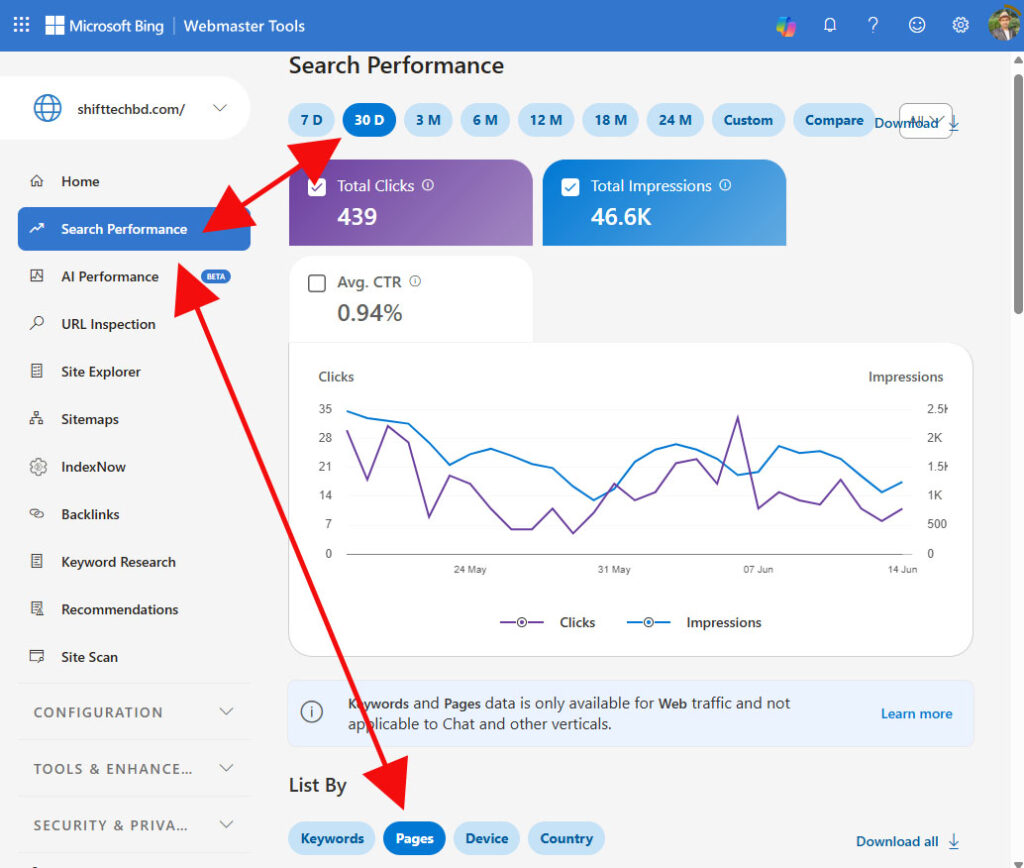
2. Check Bing Webmaster Tools
You can also review the Search Performance report inside Bing Webmaster Tools. Pay close attention to posts that are getting a high number of impressions but relatively low clicks. These posts usually have strong ranking potential, and with proper optimization, they can generate significantly more traffic. Add those posts to your update list as well.
3. Use Jetpack Plugin Data
Another simple way to analyze the last 30 days’ website performance is by using the Jetpack plugin data if you are already using it.
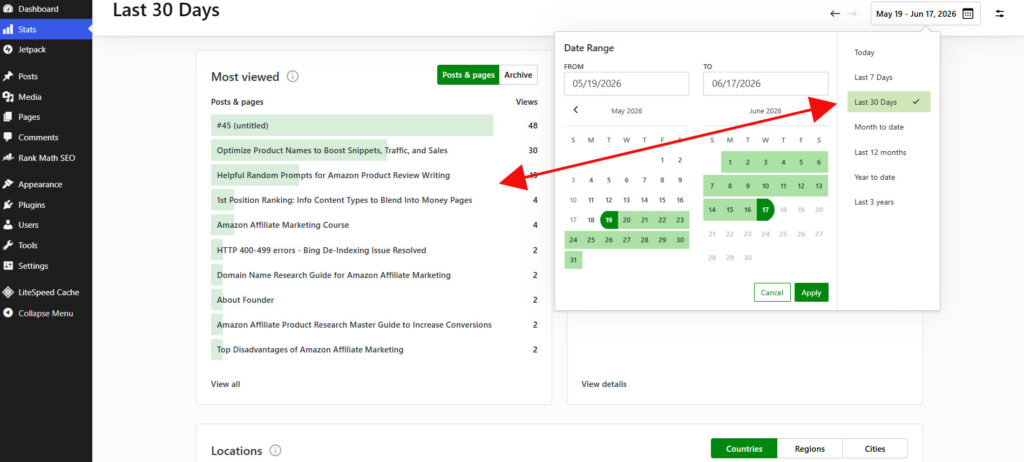
If not, I recommend installing it. From your WordPress dashboard, you can easily track organic visitors, traffic trends, and click data for free with Jetpack.
If you run an Amazon affiliate website, you can also read my detailed article about the essential plugins that are commonly used for affiliate sites. Must-Have Plugins for Every Amazon Affiliate Website
Step-2: Evaluate Existing Product List
After selecting the posts, check the top 10 recommended products in those articles one by one. Give the highest priority to checking the top three products, since they usually generate the majority of clicks and conversions.
Carefully analyze their sales performance, especially the “Bought in Past Month” data. If the sales numbers look weak, the product is unavailable, or the listing quality has dropped, shortlist two to three products in each article that need to be replaced or updated immediately.
This step is important because outdated or low-performing products can reduce both click-through rates and affiliate conversions over time.
1. Selecting Alternative or New Products
Next, you have to find two to three best-selling products on Amazon according to your specific post or keyword to replace less effective products or add more powerful, emerging alternatives
By “best-selling,” I mean products that show the strongest “Bought in Past Month” numbers for your target keyword on Amazon. However, do not focus only on sales volume. The product price should also stay within a balanced range, not too cheap and not overly expensive.
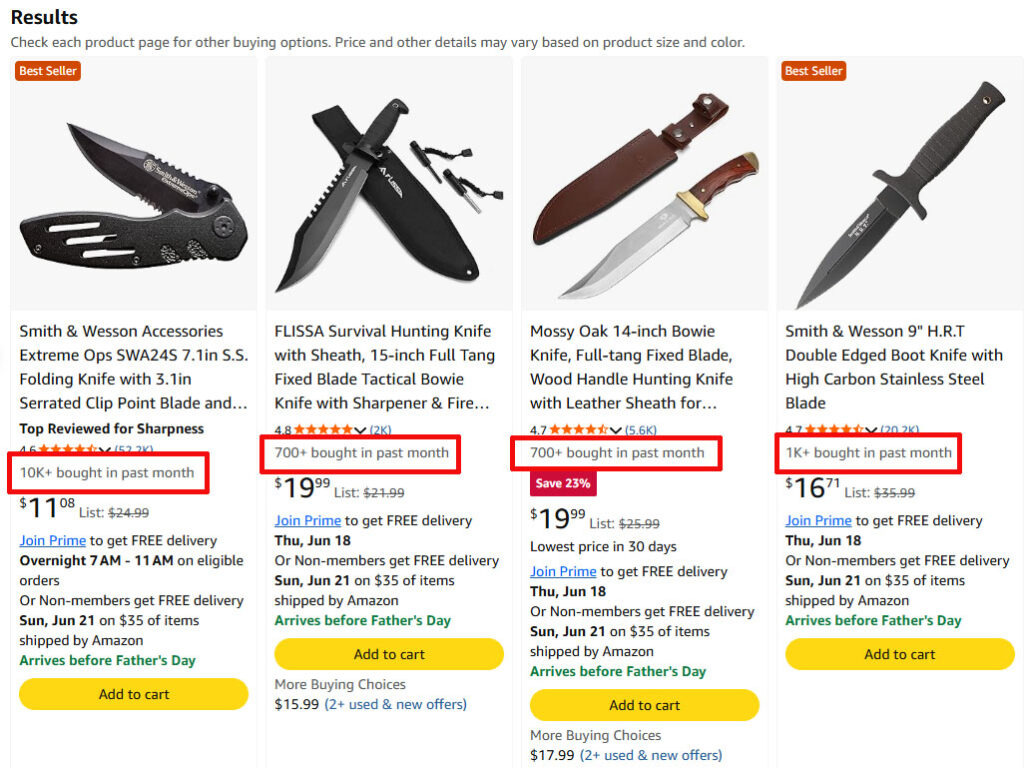
For example, if your niche mainly targets products priced between $30 and $150, the ideal average range would usually be around $40 to $80. Avoid choosing products under $20 whenever possible, even if their sales numbers look high, because the affiliate commission is usually too low.
On the other hand, products priced above $100 often generate fewer sales, which can reduce overall conversion potential. The goal is to find products with a healthy balance between sales volume, conversion rate, and commission value.
Amazon Affiliate Product Research Master Guide
Also look for newer products that are currently selling well. In many cases, newly trending products with strong “Bought in Past Month” numbers can outperform older recommendations and attract more clicks and conversions.
Try to replace weak or outdated products with options that have better sales momentum, strong customer feedback, stable availability, and competitive pricing.
2. Optimizing the Number of Products in Your Top List
If your product list is a “Top 5” type review article, such as “5 Best Digital Cameras in 2026,” and all existing products are performing well, you can strategically add 2 to 3 more strong products to expand it into a Top 7 (7 Best Digital Cameras in 2026) or Top 8 (8 Best Digital Cameras in 2026) list.
However, if your Top 10 list does not contain any weak or underperforming products, it is often better to focus on improving and updating the existing reviews instead of expanding the list unnecessarily.
On the other hand, if there are poor-performing products within your Top 10, you should definitely replace them with better alternatives. I would recommend never extending the list to Top 12 or Top 13 by adding new products. Going beyond 10 products can create decision fatigue, where visitors feel overwhelmed and struggle to choose the right option.
A focused Top 10 list with high-quality, well-selected products almost always performs better than a longer list filled with mixed-quality options.
Step-3: Complete Reviews of New Products Before the Event
Let’s assume you have identified around 20 posts that need updating. Within those posts, you may find approximately 40 to 60 products that require replacement or improvement. You also already have suitable alternative products selected from Amazon for each of them.
At this stage, the next step is to prepare everything in advance. Write the reviews for all the selected 40 to 60 replacement products before the Event Day period begins. This preparation ensures that you can move quickly when the time comes.
Step-4: Start Updating Review Articles Before the Event
Just 1 to 2 days before Event Day, go back to those posts and start replacing the weak or outdated products with the newly prepared review content one by one. At the same time, manually update the publish date of each post. Simply set it to the current date at the time of updating.
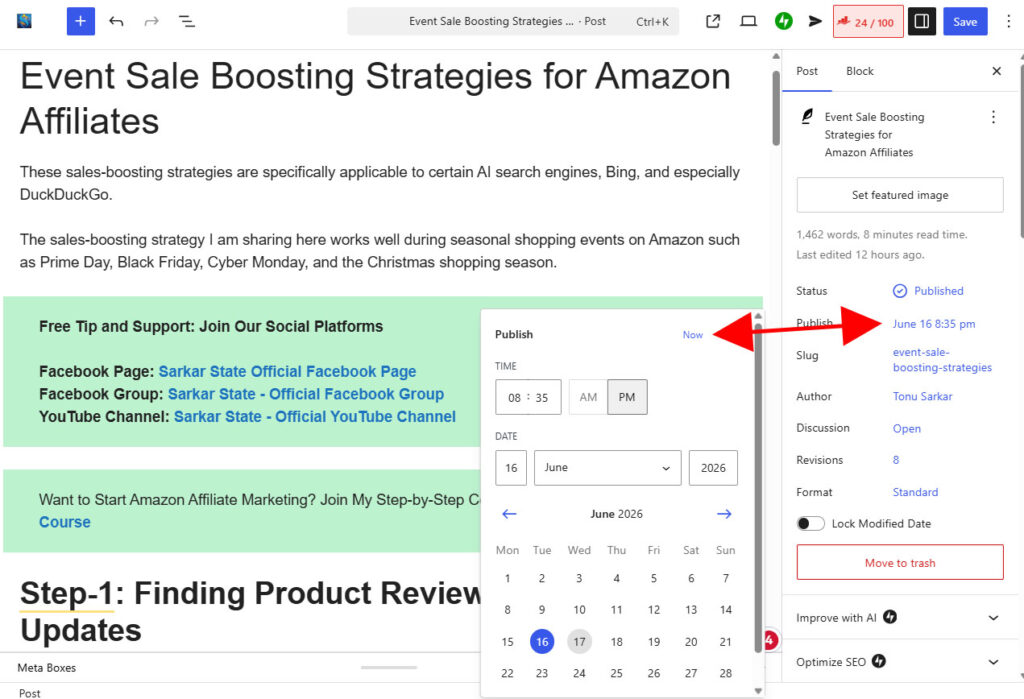
This approach helps keep your content fresh, improves search visibility during high-traffic sales events, and allows your site to respond quickly when demand spikes.
Info Article Monetization Tip
If an informational article is already generating good traffic, you can strategically place a Event Day related banner after the first one or two paragraphs. Include an affiliate link within the banner to maximize visibility and click potential.
This approach works best because readers are still highly engaged at the beginning of the content, which increases the chances of affiliate clicks without disrupting the reading experience.
Now let’s answer some questions that might be on your mind
Question: Why should posts be updated 1 to 2 days before a major sales event?
Answer: I have observed that after updating an article, it often shows a positive impact within the next 24 to 72 hours in some AI search engines and Bing. However, this impact usually fades by around 80% within the following 24 to 72 hours.
That is why I recommend updating your posts just 1 to 2 days before major sales events. This timing helps you take full advantage of the short-term ranking boost and visibility increase during the most important traffic window.
Question: Why should you manually update the post date?
Answer: Different AI search engines, regular search engines, Bing, and especially DuckDuckGo tend to give slightly higher priority to fresh or recently updated content. When an older article is improved and its date is updated, it often receives increased visibility within the next 24 to 72 hours.
Because of this behavior, manually updating the post date after making improvements can help your content appear more relevant and gain better priority, particularly in DuckDuckGo compared to other search engines.
Special Note
The tips shared here are the result of my long-term research and practical experience. In most cases, they have delivered strong results for me.
However, this does not guarantee that you will get the exact same outcome in every situation. Results may vary depending on your niche, website authority, and implementation method. In some cases, performance may even differ, although the chances of negative impact are generally low because search engines tend to favor improved and updated content.
Since you are focusing on improving content quality and updating existing pages, this approach is generally aligned with what search engines prefer.
Use these strategies at your own discretion and apply them based on your website’s needs.
Final Note
If you face any difficulty understanding any part of this guide, or if you feel something should be added, feel free to share your thoughts in the comments below. You can also let me know how you found this article.
I will do my best to help you and provide further clarification whenever needed.