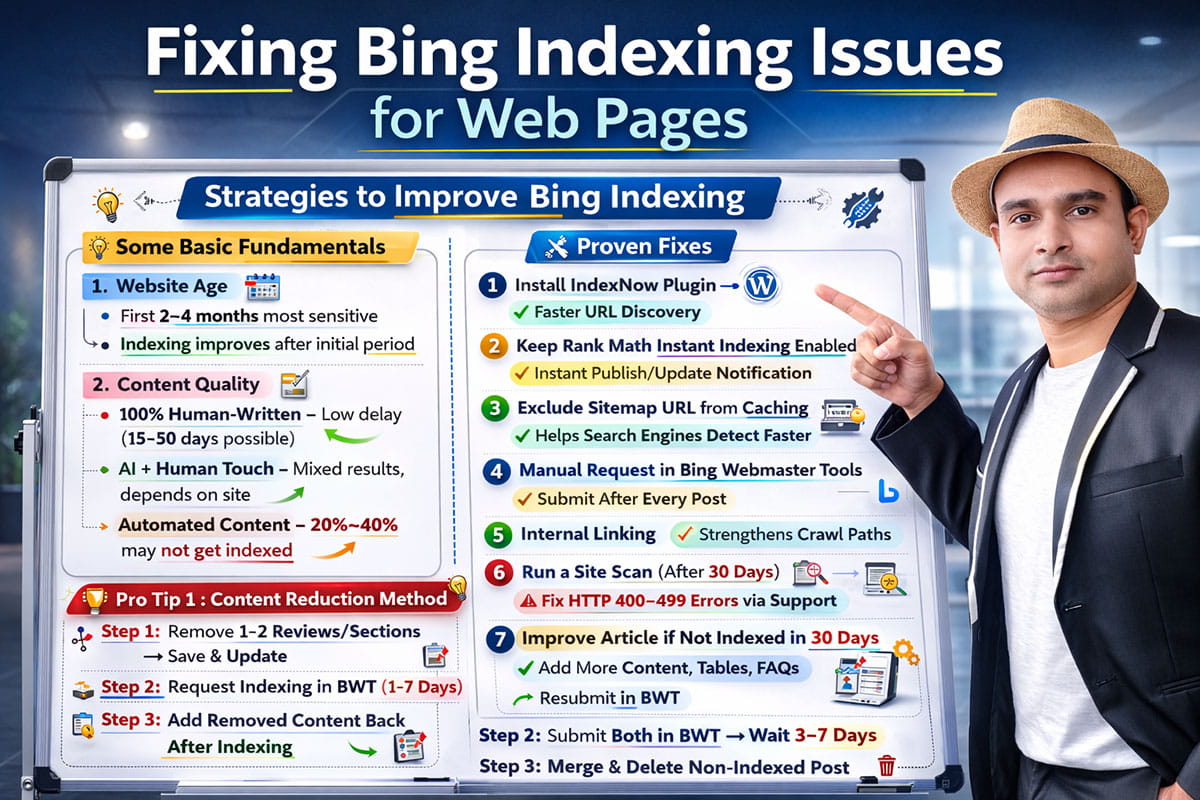
On almost every website built for Amazon affiliate marketing – especially in the early stages – you’ll notice that getting posts indexed on Bing can take time. For beginners, this delay can be incredibly frustrating and even discouraging. I’ve been there myself.
In this guide, I’ll share some basic fundamentals along with a few experience-backed “hidden” tricks that have worked for me over time. When applied correctly, these strategies can significantly reduce your indexing issues and help your content appear faster in Bing’s search results. So without wasting any more time, let’s dive in.
One important thing to keep in mind: Bing indexing largely depends on Bing’s own algorithmic discretion – but your strategy and execution still play a crucial role in influencing how quickly and effectively your pages get indexed.
Some Basic Fundamentals
1. Website Age
From my experience working on multiple Amazon affiliate blog sites, the first 2-4 months are the most sensitive when it comes to Bing indexing. During this early phase, Bing tends to “observe” your site more closely. Indexing delays are very common.
However, once you cross that initial age threshold, things usually start improving. The time it takes for your posts to get indexed gradually decreases. In short, patience plays a big role in the beginning – but consistency pays off.
Content Quality
In my experience, Bing indexing heavily depends on content quality. Let me break this down clearly based on what I’ve personally tested and observed.
100% Human-Written Content: Even if your content is completely human-written, you can still face indexing delays on Bing, though the chances are relatively low. That said, I’ve seen cases where fully human-written sites still took 15-50 days for certain posts to get indexed.
So while human-written content reduces risk, it does not guarantee instant indexing.
AI Content with Proper Human Touch: Interestingly, I’ve achieved almost similar results with AI-generated content that was properly edited and refined with a strong human touch.
Using the same strategy across different sites, I’ve noticed inconsistent outcomes. On one site, posts get indexed quickly. On the other hand, they take much longer. This again reinforces what I mentioned earlier – Bing often works according to its own discretion.
Automated Content: Automation-driven content behaves very differently. Even when automation is used correctly and the site is structured properly, indexing issues remain very common.
I’ve observed that on some sites, most posts get indexed within 24 hours of publishing. On others, indexing can take weeks, and sometimes 20% to 40% of the content never gets indexed at all.
So based on my experience, automation increases unpredictability. It can work extremely well – or create persistent indexing challenges, depending on how Bing evaluates your site.
Proven Fixes for Solving Bing Indexing Issues
Keeping the above factors in mind, let me now share a few practical methods that I’ve personally tested. By following these, you can significantly reduce – if not completely solve – your site’s Bing indexing issues.
1. IndexNow Plugin
This is Bing’s official WordPress plugin. If you’re serious about improving indexing speed, I strongly recommend installing and properly setting it up on your site. In my experience, it helps Bing discover new URLs much faster compared to waiting for natural crawling.
That said, if you’re already using Rank Math and have its Instant Indexing feature enabled and properly configured, you don’t necessarily need to install the separate Bing IndexNow plugin. Rank Math can handle the same function efficiently.
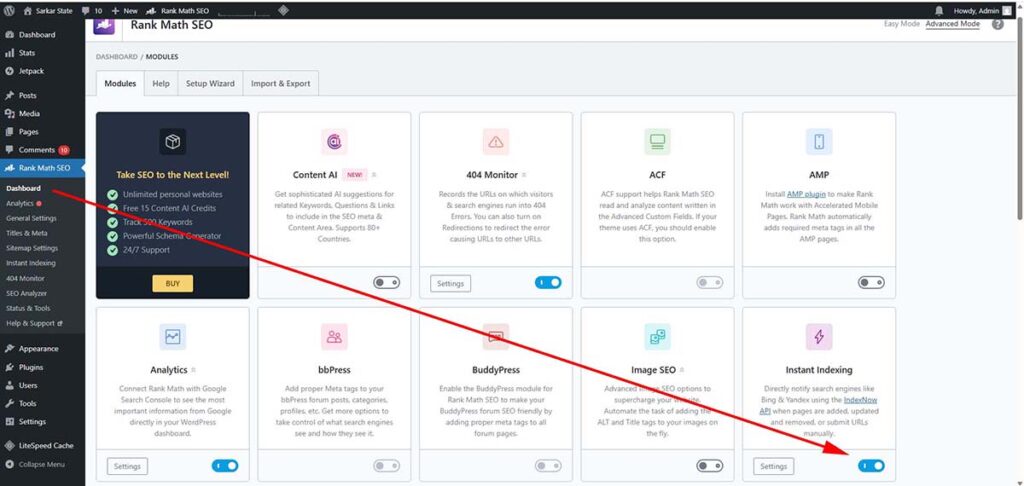
2. Keep Rank Math’s Instant Indexing Enabled
As shown in the image, you should always keep Rank Math’s Instant Indexing feature turned on. Whenever you publish a new post or update an existing article, this feature notifies search engines instantly.
However, from my personal experience, when a site is already facing indexing issues, the impact of this feature isn’t always visibly strong. It helps, but it’s not a magic fix if deeper problems exist.
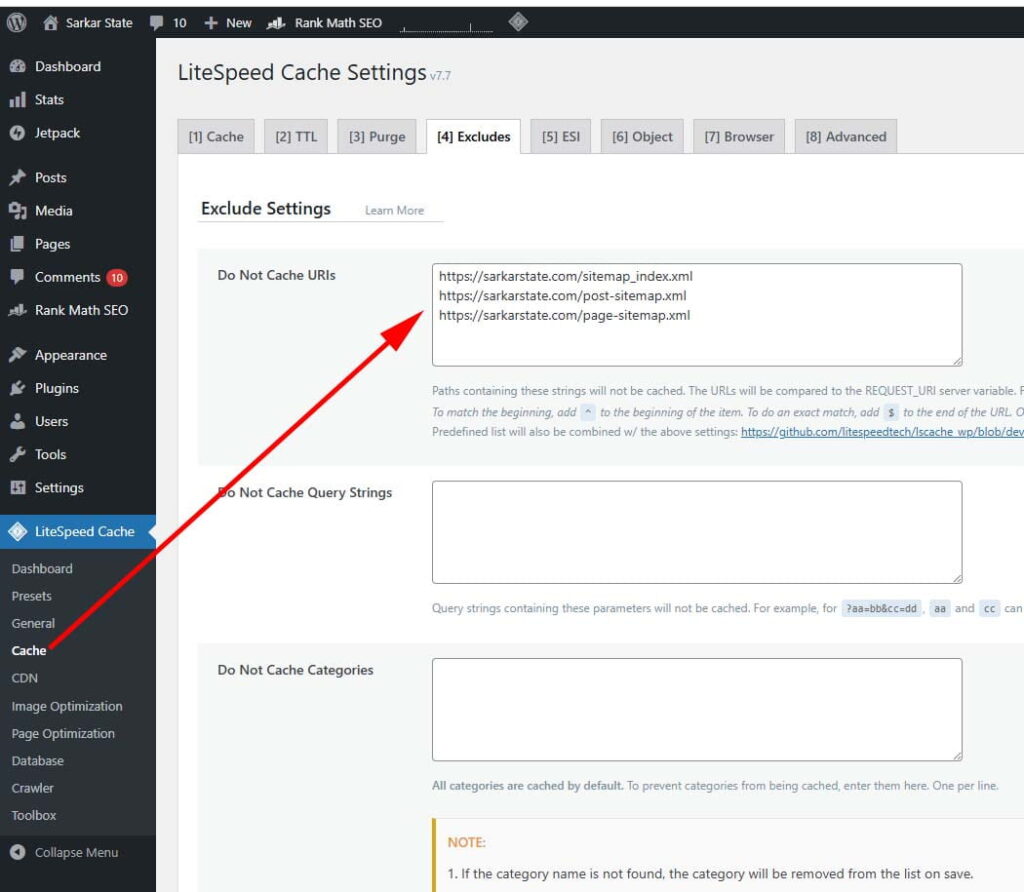
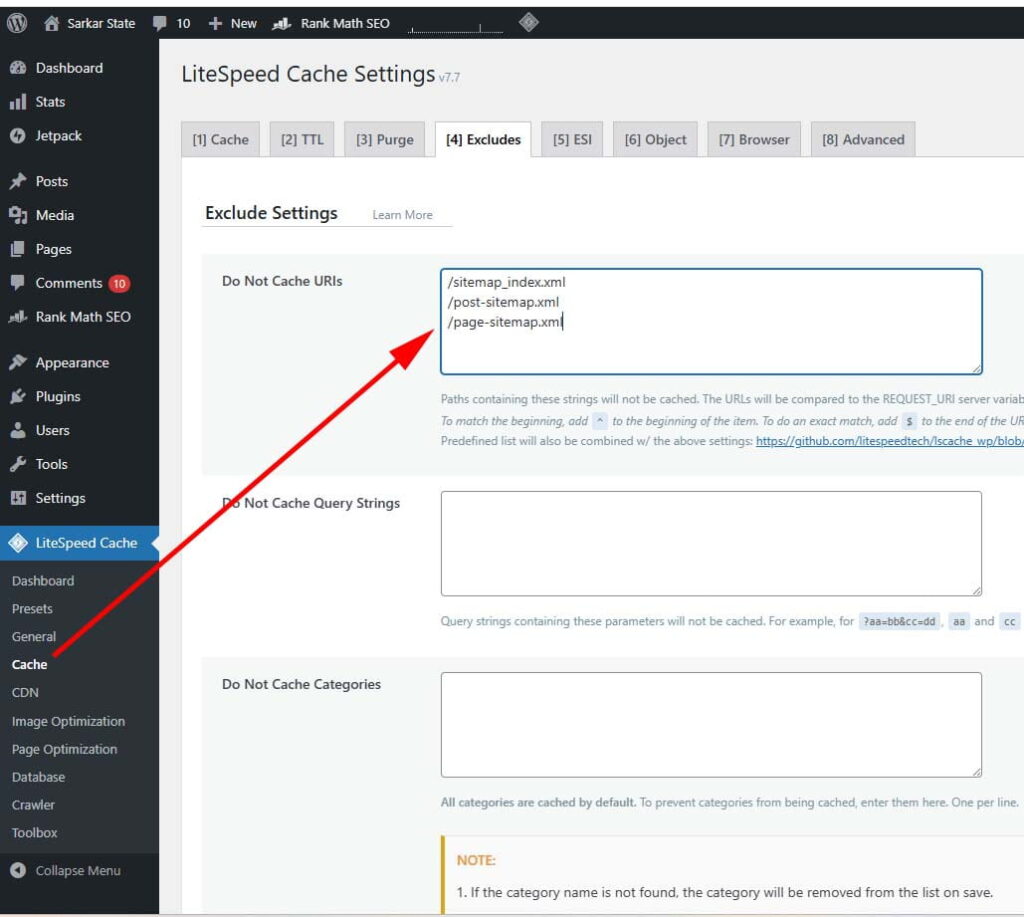
3. Exclude Sitemap URL from Your Caching Plugin
If you’re using any caching plugin, make sure to exclude your sitemap URL (or at least its prefix) from being cached.
This is a small but critical step. When your sitemap isn’t cached, new URLs get updated immediately inside the sitemap file. As a result, search engines can detect fresh content faster, increasing the chances of quicker indexing. I’ve seen noticeable improvements just by fixing this simple setting.
4. Manually Request Indexing in Bing Webmaster Tools (BWT)
After publishing a post, manually submit an indexing request in Bing Webmaster Tools (BWT). I personally make this a habit. Relying only on automation isn’t enough; manual submission adds an extra signal and sometimes speeds up the process significantly.
5. Internal Linking
Internal linking is not the most powerful indexing strategy, but it still helps. If possible, link your new posts to relevant existing articles. While it may not instantly fix indexing issues, it strengthens crawl paths and improves overall site structure.
6. Run a Site Scan
If your content quality is strong and you’ve followed all the steps above, but a specific post still isn’t indexed within a month, use the Site Scan feature inside Bing Webmaster Tools.
In many cases, you’ll find common issues like HTTP 400–499 errors. This is usually a crawling-related problem. Google’s bots tend to handle these situations more gracefully, but Bing’s crawler sometimes struggles.
If you notice such errors, contact Bing Webmaster Support immediately. Ignoring these technical signals can delay indexing indefinitely.
7. If Nothing Works – Improve the Article
If your post remains unindexed even after a month, and support doesn’t resolve the issue, then it’s time to improve the content itself.
Enhance the article by:
- Adding more informative content and a table to your money page
- Expanding product reviews with deeper insights
- Including better comparisons, FAQs, or supporting data
After updating the article, always manually submit another indexing request in Bing Webmaster Tools.
Content refinement combined with manual re-submission often triggers indexing when everything else fails.
Pro Tips (Based on Long-Term Testing)
What I’m about to share isn’t theory. These methods come from years of testing across multiple Amazon affiliate sites. After repeated trials and real-world experimentation, I’ve achieved a 95% success rate using these techniques.
However, there’s an important condition.
Only apply these strategies if:
- Your article quality is genuinely good
- Bing’s crawler isn’t detecting any negative technical signals
- There are no major site-level issues
If those fundamentals aren’t solid, you might still see results—but you likely won’t achieve the same 95% success ratio I’ve experienced.
Also, only apply these methods if your post hasn’t been indexed within 20 days of publishing. Don’t rush into this too early.
Pro Tip 1: Content Reduction Method
Let’s say your money post contains 10 product reviews.
In this case, remove 1-2 product reviews (it could be the 9th and 10th items, or maybe the 4th and 7th, position doesn’t matter). Cut those reviews/sections and move them to the draft.
Then:
- Update and save the edited article.
- Manually request indexing in Bing Webmaster Tools.
In most cases, the updated version gets indexed within 1-7 days.
Once the article is indexed, simply add the removed reviews back into their original positions and update the post again.
From my experience, this “content reduction trigger” works surprisingly well. I’ve seen success in about 95% of cases using this method.
Pro Tip 2: Article Splitting Method
If the reduction method doesn’t work, wait another 10-15 days and then apply this second strategy.
Step 1: Split the Article into Two Posts
Divide your original article into two parts:
Post 1 (Original URL):
- Introduction
- First 5 reviews (1-5)
Post 2 (New URL):
- Same title
- Remaining reviews (6-10)
- Buying guide+FAQs
- Conclusion and final sections
Step 2: New vs. Old Posts’ URL Structure
Typically, the first post uses a plural keyword in the title and URL (for example, “10 best smartphones”).
For the second post:
- The title can still use the plural keyword
- But remove the plural “S” from the URL
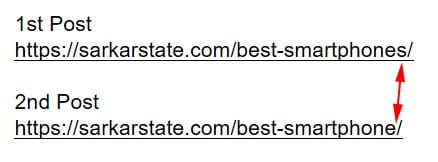
This keeps both posts closely related but technically distinct in structure. Even though the content theme is similar, the URL variation creates separation in Bing’s eyes.
After that, you need to manually submit both posts for indexing again in Bing Webmaster Tools.
Step 3: Delete the Non-Indexed Post
In most cases, this method shows results within 3-7 days. One of the two posts usually gets indexed first (in about 90% of cases, it’s the old post that gets indexed first). Once that happens, keep the indexed post live.
Then, take the content from the post that did not get indexed and merge it back into the indexed one. After properly combining the content and updating the article, you can safely delete the non-indexed post.
Why This Works (From My Observation)
Based on my testing, Bing sometimes struggles with long, heavy money pages, especially on affiliate sites. By reducing content weight or splitting authority across two URLs, you may trigger a fresh crawl evaluation.
It’s not a guaranteed hack, but in my personal case studies, it has delivered consistent results when standard methods failed.
Final Verdict
There’s one important thing I need to mention from my personal experience.
Even if your content is extremely high quality, it can still take anywhere from 1 week to 1.5 months to be indexed on Bing.
Let me give you a real example from my own portfolio. I have one site where posts get indexed within 24–48 hours. But honestly? I wouldn’t call that content high quality; it’s average at best. On the other hand, I have two other sites where the articles are significantly higher quality, more detailed, and better optimized. Yet those articles typically take around 7 days to nearly a month to get indexed.
What does this tell us?
It clearly shows that indexing speed is not determined by content quality alone. A big part of how fast your pages get indexed depends on Bing itself, its crawl behavior, trust signals, site history, and algorithmic preferences.
So while optimizing your content and technical setup is important, you also need patience. Sometimes, indexing is simply at Bing’s discretion.